Election Tracker
Free on iPhone · No account

The polls, by race — averaged, dated, and sourced.

Election Tracker collects the US polling that actually gets published and puts it in one place. Senate, House, governor and 2028 primary polls grouped by race, each with a 30-day average that shows its work; presidential approval with a 90-day trend; and prediction-market prices, labelled as the sentiment they are.

no account last good data kept offline light & dark every screen names its source
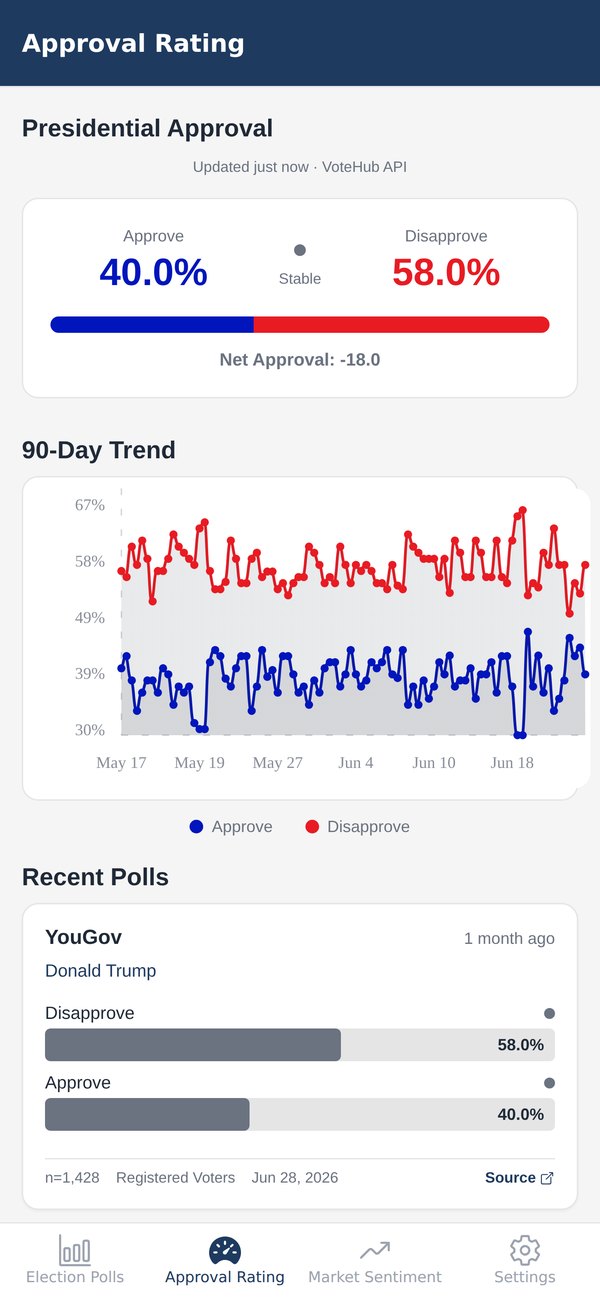
The Approval Rating screen: approve in blue and disapprove in red either side of the net number, a split bar underneath, and a 90-day chart of both series as a 7-day average
Election Polls

Grouped by race, not by headline.

Four tabs, and inside each, every race that has polling — newest first. A poll without its pollster, sample and field dates is just a number, so every card carries all three.

  • Pollster, sample size, population (likely voters, registered voters, adults) and field dates on every card
  • Every race on one line — who leads, by how much — that opens to its 30-day polling average, and a trend line once a race has enough polling over enough time
  • The generic congressional ballot and every polled district under House; both parties' primaries under 2028
  • Find any race by state, district or candidate; polls that are new since your last visit are marked

Poll data from VoteHub. Coverage follows what pollsters publish, so a race thickens out as it heats up.

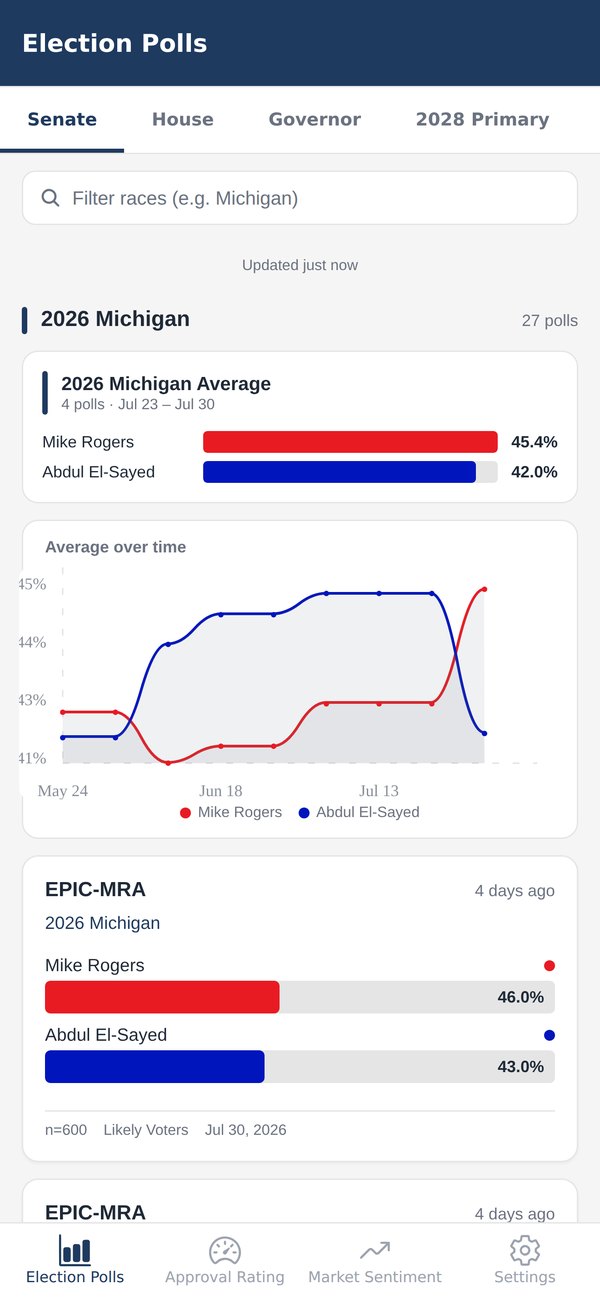
The Election Polls screen on the Senate tab: a search field, the election countdown, and one row per race with its leader's margin, poll count and latest poll date
The average

An average that shows its work.

Most polling averages are a black box. This one has three rules, and they're short enough to print.

Duplicates collapse

A pollster often publishes one poll several ways — likely and registered voters, or a handful of hypothetical matchups. It counts once: the version about the race as it stands, likely voters first, the full ballot over a head-to-head.

Newer polls weigh more

Linear recency weighting across a 30-day window. Last week's poll pulls harder than one from four weeks back.

A minimum number of appearances

A candidate has to turn up in enough polls before they're averaged at all. One-poll wonders stay on their own card.

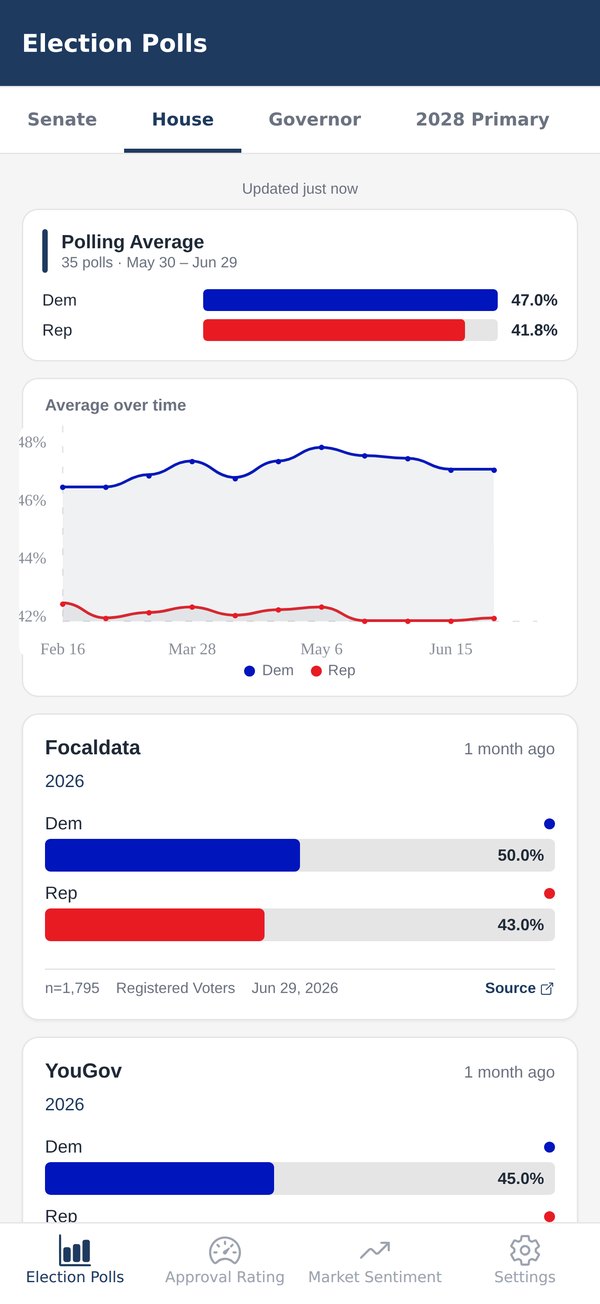
Polling Average35 polls · May 30 – Jun 29
Dem47.0%
Rep41.8%
Average over time
DemRep
same-day versions → onelinear recencymin. appearances

The card from the House tab — the generic congressional ballot, 35 polls over 30 days. Every race with polling gets one.

Approval Rating

Approve, disapprove, net — averaged, with ninety days of context.

The headline numbers up top, a 90-day trend beneath, and every individual poll under that with its sample and dates. Drawn from VoteHub, or from the polls The New York Times collects whenever VoteHub falls behind — the screen says which.

  • Approve and disapprove side by side, the net number, and whether it's rising, falling or stable
  • A 90-day trend with both series on one chart
  • The other major averages — RealClearPolitics, Silver Bulletin, the Times and more — listed beside the app's own
  • Recent polls beneath, each with n, population and field date
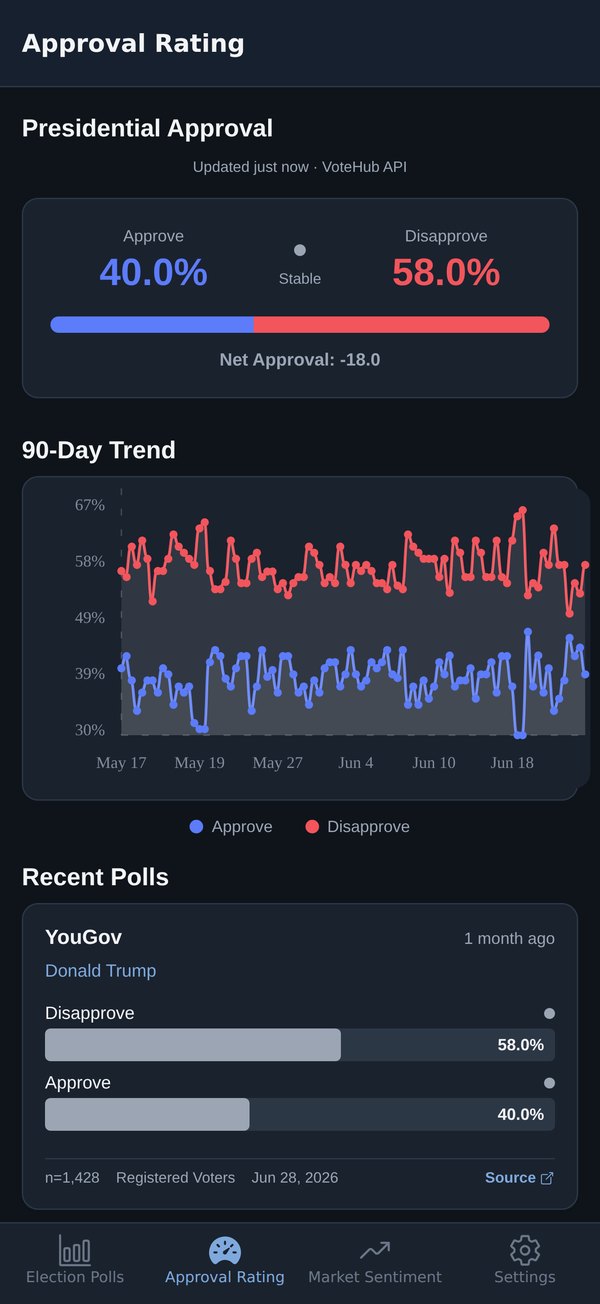
  • Light and dark themes that follow your device — this is the dark one
The Approval Rating screen in dark mode: the approval chart, then the other major averages listed beside the app's own
Market Sentiment

What traders think, labelled as exactly that.

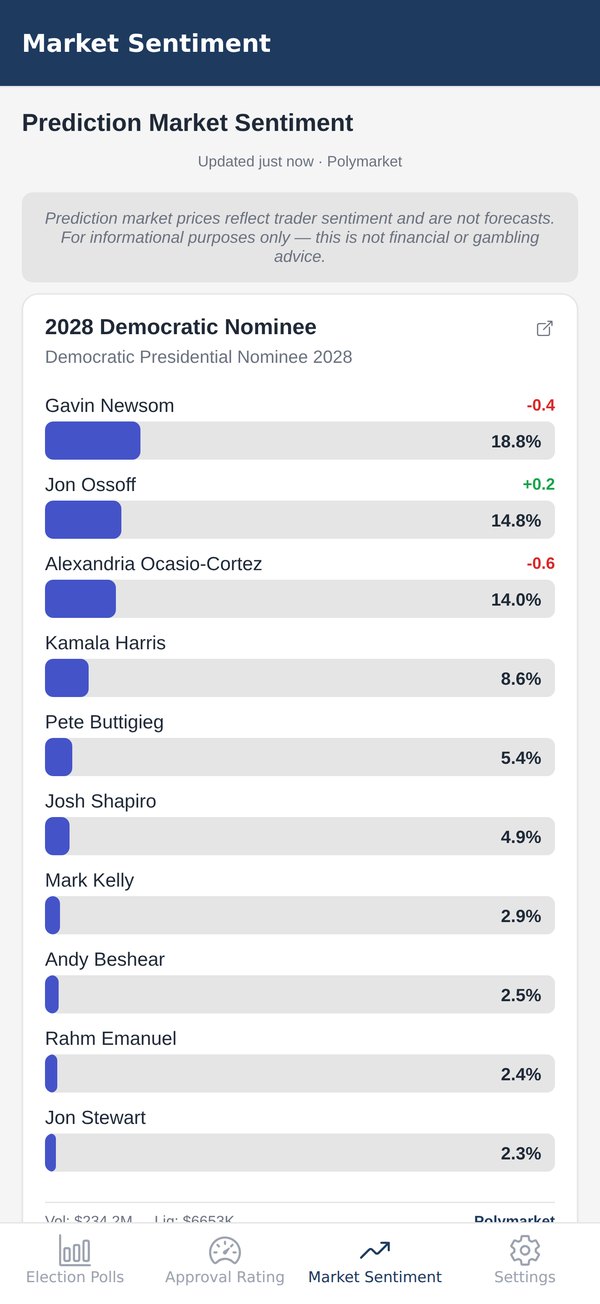
Current Polymarket prices for the races people are watching, with 24-hour moves on the leading outcomes. Prices are trader sentiment, not forecasts — and the screen says so before it shows a single number.

  • Read-only: the app takes no wagers, holds no funds and processes no transaction
  • 24-hour move badges on the leading outcomes of each card
  • A link out to the public market page if you want the rest of the field
  • Which markets appear is a remote setting, refreshed as the cycle moves
Currently tracking · 15 markets
2028 Democratic Nominee2028 Republican Nominee2028 Presidential Election WinnerCalifornia Governor 2026House Control 2026Balance of Power: 2026 MidtermsSenate Control 2026Republican Senate Seats After 2026Maine Senate Election 2026Alaska Governor 2026Texas Senate Election 2026Florida Governor GOP Primary (Aug 18)Michigan Democratic Senate Primary (Aug 4)Minnesota Governor GOP Primary (Aug 11)Wisconsin Governor Democratic Primary (Aug 11)

Prediction market prices reflect trader sentiment and are not forecasts. For informational purposes only — this is not financial or gambling advice.

The Market Sentiment screen: a disclaimer banner, then the 2028 Democratic Nominee market with candidate price bars and 24-hour move badges, linking out to the public market page
The screens

Four tabs. No feed.

Polls, approval, markets, settings. Here's the whole app.

Election Polls, Senate tab: one row per race, each with its leader's margin, poll count and latest poll date

Election Polls

Every race on the Senate tab, one line each: who leads, by how much, and how recently polled.

A Senate race opened: its polling average with each candidate's share, and the average-over-time chart

Polling average

Tap a race and it opens in place: the average, the line of it over time, then every poll.

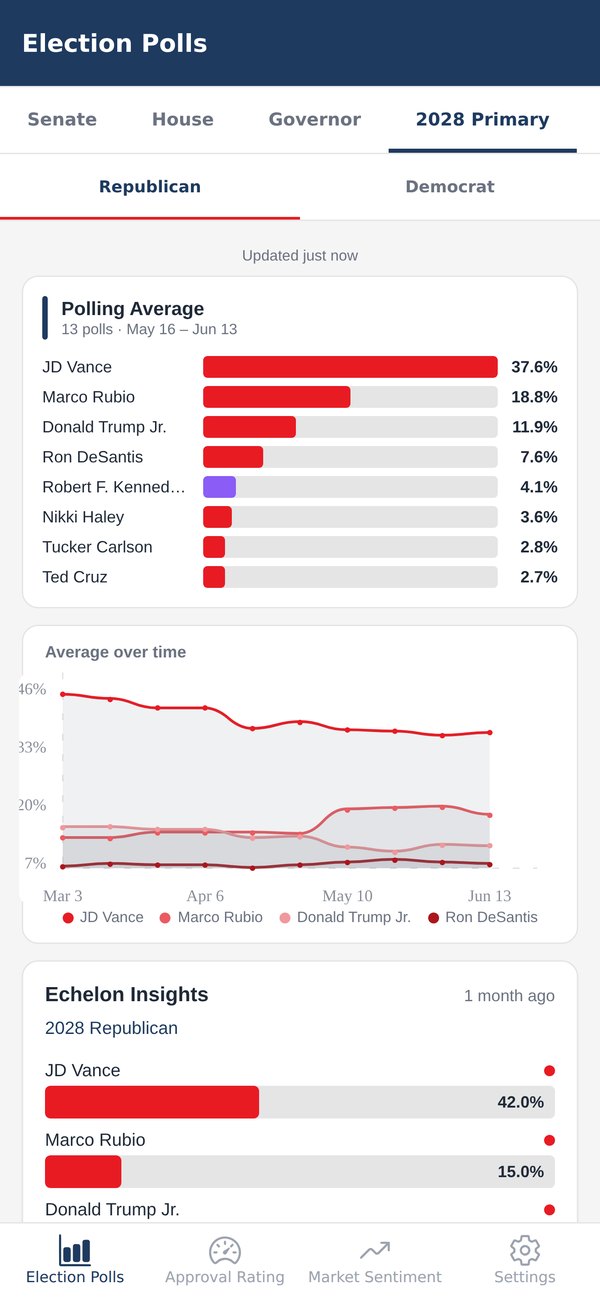
The 2028 Primary tab with Republican and Democrat sub-tabs: the Republican field's polling average, an average-over-time chart of the leading candidates, and poll cards

2028 primaries

Both parties' fields, each with its own average and trend — shaded so same-party lines stay apart.

Approval Rating: approve, disapprove and the net number, and the 90-day trend chart

Approval Rating

Approve, disapprove, net, and ninety days of both on one chart.

Market Sentiment: the disclaimer banner above a 2028 nominee market with price bars and 24-hour moves

Market Sentiment

Polymarket prices with 24-hour moves, under a disclaimer that doesn't scroll away.

The Approval Rating screen in the dark theme: the approval chart, then the other major averages listed beside the app's own

Other averages

The app's number beside RealClearPolitics, Silver Bulletin and the rest — here in dark mode.

Built to be read quickly

Small app, honest about its data.

Everything in it exists to get you to the number and its provenance faster. Nothing in it exists to keep you scrolling.

Freshness labels

Every screen says when it last refreshed — and says plainly when it's showing you something older. Polls that arrived since your last visit are marked as new.

Works when the signal doesn't

The last good response for every screen stays on your device. On a plane you see the most recent numbers you had, marked as such — not a spinner.

Pin, find, share

Star the races you follow to keep them open at the top of their tab, find any race by state, district or candidate, and share any average as plain text with its poll count and dates attached.

Election reminders

Optional local reminders at 30 days, a week, a day out and on election day. Scheduled on the device; nothing is sent anywhere.

Follows your device

Light and dark themes — party colours re-tuned for each so bars stay legible — picked up from your system setting, or pinned in Settings.

No account, no sign-up

Nothing to log into. No profile, no record of what you read, no newsletter. Free, with ads — nothing gated behind one — and a one-time purchase turns them off.

Where the numbers come from

Every screen names its source.

Four public sources, each credited on the screen that uses it, with how fresh its data is.

Polls · Approval

VoteHub

Election polls, queried per race, and presidential approval. The primary source for both polling tabs.

api.votehub.com
Approval and the generic ballot, when VoteHub lags

The New York Times

Its published lists of presidential approval polls and of House polls, used whenever VoteHub's feed is behind or unreachable. Poll data © The New York Times, used under CC BY 4.0; the averages are this app's own.

nytimes.com · polls
Other averages

Wikipedia

Its tables of the other major averages — RealClearPolitics, Silver Bulletin, Decision Desk HQ and more — listed beside the app's own.

en.wikipedia.org
Market prices

Polymarket

Read-only prices from the public API, each card linking to the public event page. Sentiment, not forecasts.

gamma-api.polymarket.com

Election Tracker is independent — not affiliated with any pollster, campaign, party or data source. Polling reflects the moment it was taken and does not predict an outcome.

Questions

The short answers.

Is it free?

Yes. It's free and supported by ads — a banner, and a full-screen ad when you come back to the app, at most once every half hour. No content is gated behind an ad. If you'd rather not see ads at all, a single one-time purchase in Settings removes them for good — it isn't a subscription.

Where does the data come from?

Polls from VoteHub; presidential approval and the generic ballot from VoteHub, or from the polls The New York Times collects whenever VoteHub falls behind; other trackers' averages from Wikipedia's tables of them; market prices from Polymarket. Every screen names its source on-screen and shows when it was last refreshed.

How often does it update?

Each screen fetches fresh data when you open it or pull to refresh — polls are re-checked every 30 minutes, approval hourly, markets every 15 minutes. If a source is slow or you're offline, the last good response shows, clearly marked as older.

Is this a betting app?

No. The Market Sentiment tab is a read-only view of public Polymarket prices as a sentiment indicator. The app takes no wagers, holds no funds and processes no transaction, and the disclaimer at the top of that screen says the prices are trader sentiment, not forecasts.

Is it partisan?

No. It shows what pollsters publish for every candidate in a race, and averages them by one stated method — explained in plain words in the app, under Settings › How the numbers work — with the other major averages listed beside its own. Party colours are the conventional ones, and nothing is editorialised.

Does it work offline?

Partly. It needs a connection to fetch new numbers, but the last good response for every screen stays on your device and is shown, labelled as older, whenever the source can't be reached.

Do I need an account?

No sign-up, no login, no profile. Election reminders are optional and scheduled locally on your device; nothing is sent to a server.

Which races are covered?

Senate races, the generic congressional ballot and every polled House district, governor races and the 2028 presidential primaries, plus presidential approval. Coverage follows what pollsters publish.
Know where the numbers stand.
And where they came from.

Free on iPhone. No account. Every screen names its source.